Unity with visionOS
Make a new spatial medium buildable.
As Design Lead and DRI for PolySpatial, Unity’s collaboration with Apple on visionOS, I invented a new OS behavior pattern that lets 2D and 3D apps coexist in one shared world—and led its design from spatial interactions to the tools creators use to build them.
A shared world asked more of Unity than a new deployment target. Hand and gaze input, spatial boundaries, and unfamiliar platform constraints had to become understandable experiences for both creators and the people using their apps.
My focus was to carry one design direction through the ecosystem: interaction foundations, authoring and onboarding, then simulation, remoting, and runtime UI.
- Focus
- Spatial interaction, creator workflows, and shared-world experiences
- Platform
- Unity Engine and PolySpatial for Apple visionOS, across Editor, simulator, and device
- Role
- Design Lead (DRI)
- Responsibilities
- Leading end to end UX design and product strategy of PolySpatial, a cross-platform operation system bridging Apple visionOS to Unity’s 28 platforms and Unity AI, from runtime spatial interaction to simulator, xr authoring, onboarding templates, and debug tools.
Give a new medium a design language: shared world OS
Start with concrete experiences. Use them to connect interaction, authoring, and runtime decisions.
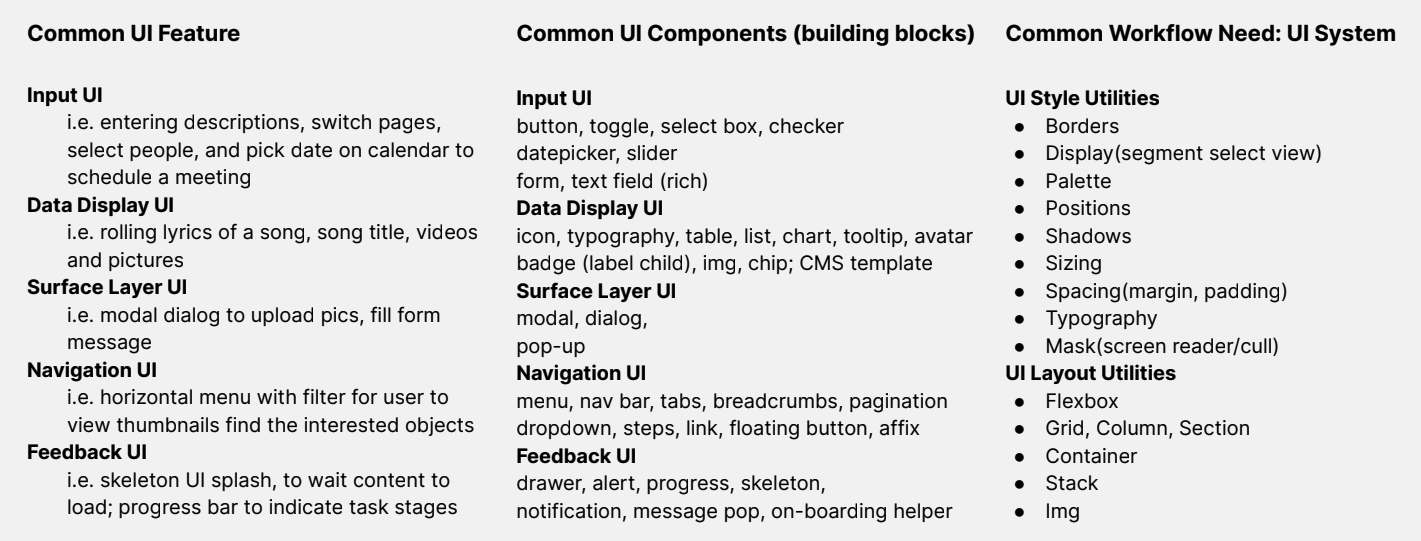
01Design system structure · feature–component–utility matrix
I brought reusable design-system patterns into hand-input prototypes, then tested tasks in a table scenario and extended the study to partner feedback. Hand occlusion and pinch-pointer affordance made the design question concrete: how do the hand, the target, and the response communicate one interaction? These studies formed part of the wider Unity XR foundation.
Direct touch
Interaction at a distance
I mapped interaction needs to reusable components and the utilities needed to author them. This put the experience and its implementation foundation in the same design system.
| UI need | Reusable components | Authoring foundation |
|---|---|---|
| Input | Buttons, toggles, sliders, fields | Typography, color, sizing, spacing, borders, layout, and accessibility utilities |
| Information | Text, icons, lists, tables, tooltips | |
| Surfaces | Panels, dialogs, pop-ups | |
| Navigation | Menus, tabs, steps, breadcrumbs | |
| Feedback | Progress, alerts, notifications, onboarding |
02Make the spatial model understandable
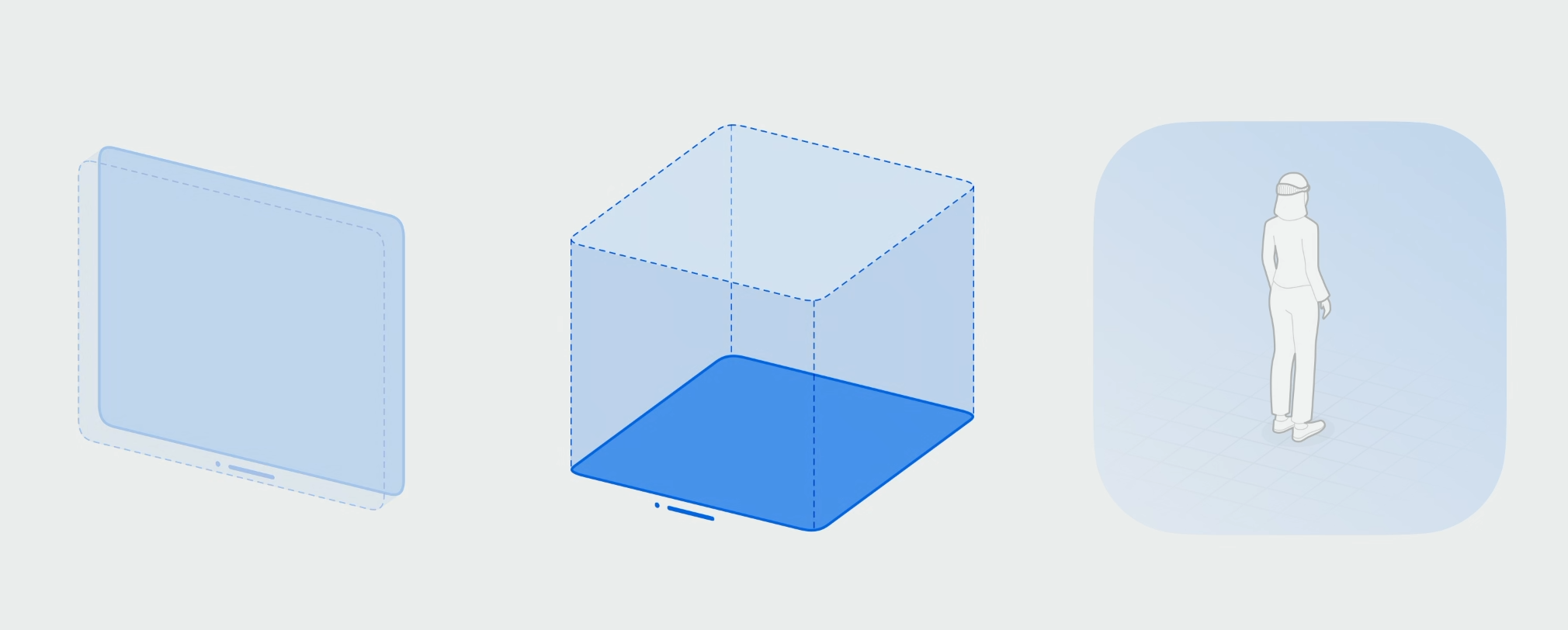
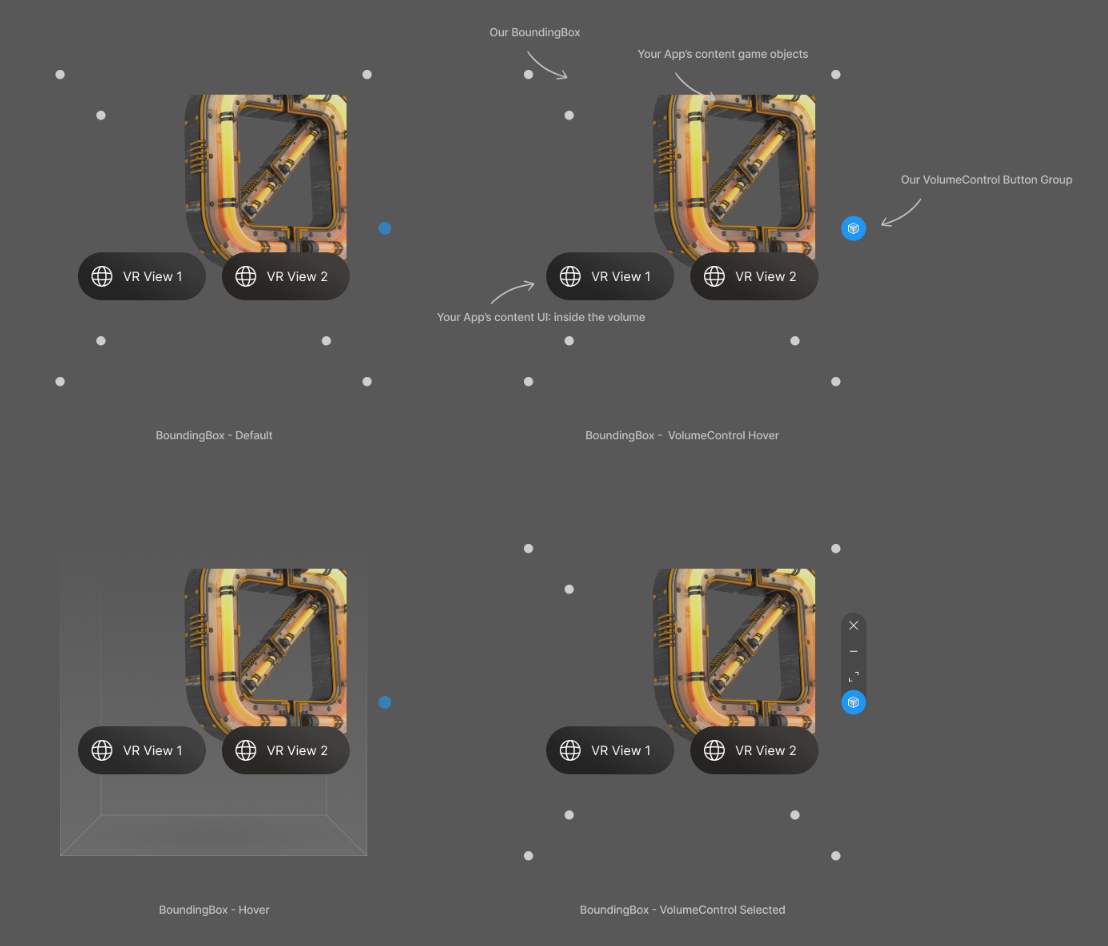
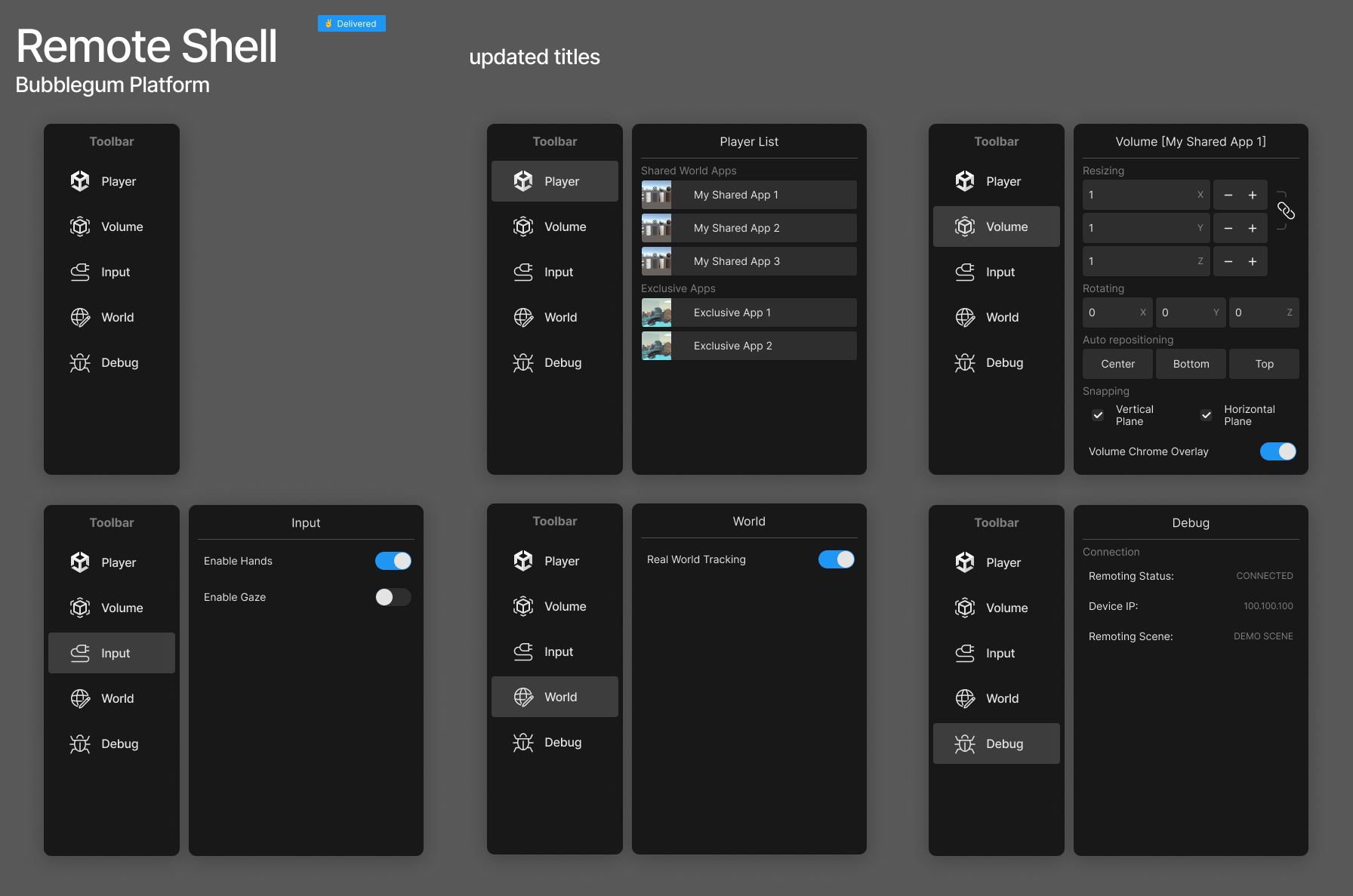
With engineering roadmaps and partner requirements pulling in different directions, I used concrete content to frame the platform: Window, Volume, and Space. That model had to hold beyond a diagram. Volume Chrome separated content, its boundary, and the controls that manage it; Remote Shell brought Player, Volume, Input, World, and Debug into one structure. The interface made an abstract spatial model inspectable through dimensions, positioning, input, and state.
Give a volume a physical boundary
A boundary people can control
03Give creators a way into the system
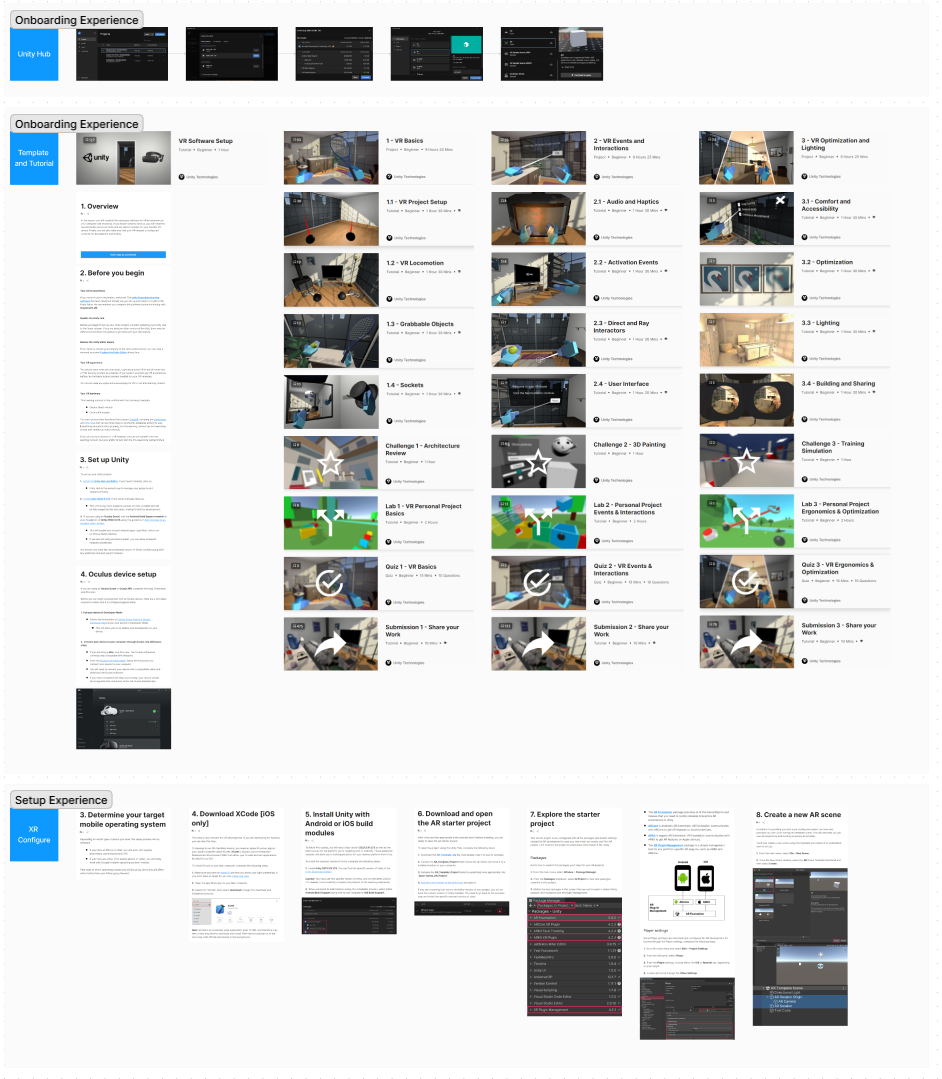
My onboarding map followed creators from an idea through setup, configuration, development, testing, and delivery. Alpha feedback surfaced unsupported components. I led the Building Blocks working group to bring modular features, sample content, and the Editor workflow into an authoring concept organized around what creators were trying to do.
The interface required coordination across Authoring, Content, and Workflow. I brought those responsibilities into a combined proposal so navigation and the material behind it could evolve together. Building Blocks was a broader Unity XR initiative—the creator-tool foundation alongside the visionOS work.
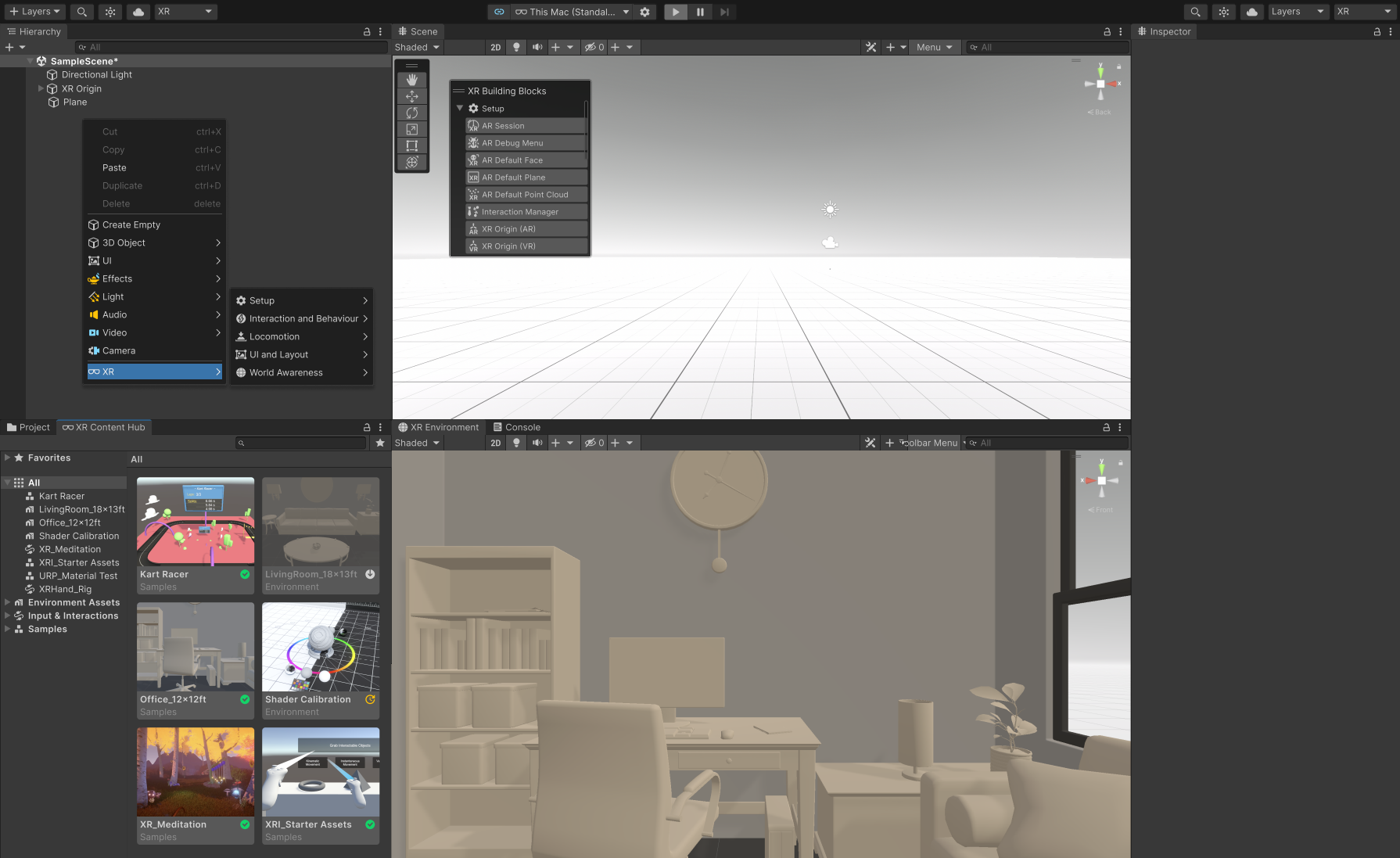
04Keep the model consistent; adapt the controls
I chose to keep the relationship between content, boundaries, and controls consistent across the headset and simulator, while adapting how people reach those controls. Testing revealed why this mattered: world-space controls were difficult to use, and overlapping windows forced people to keep rearranging their workspace. The design needed to help creators stay focused on their content as they moved between environments.
I explored controls that follow the user in the headset and a screen overlay in the simulator, weighing reachability and immersion against implementation effort and performance. For Beta, I prioritized a simpler, predictable experience: a static headset volume, with simulator mode switching deferred. The principle was to preserve a familiar spatial model while choosing controls suited to each environment.
Define the behavior. Make it buildable.
A new medium becomes usable when its interaction model carries through the tools that create it.
The most consequential design work happened where responsibilities met: input and feedback, content and authoring, simulation and runtime. Following an experience across those boundaries gave separate teams a shared design problem and made the tradeoffs visible before they hardened into disconnected workflows.
My takeaway is to follow one experience far enough to reveal those connections, then turn what it teaches us into patterns, tools, and a starting point for the next creator.