Destiny 2
An expanding universe. A clear next move.
As Feature Owner at Bungie, I worked on Worlds UI, map, HUD, navigation, and activity systems, shipping Beyond Light and The Witch Queen. My scope sat in the connective layer between player intent and the next playable action.
Destiny 2 moves players between split-second combat, careful equipment choices, and the question of what to do next. As the game expands, the interface has to connect those decisions without losing the sense of a living world.
This retrospective covers Worlds UX across Beyond Light (2020) and The Witch Queen (2022), with archived interface footage and visual studies.
- Focus
- Worlds UX, player orientation, activity discovery
- Platform
- Destiny 2 · console and PC
- Role
- Feature Owner
- Responsibilities
- Worlds UI, map, HUD, navigation, activity systems
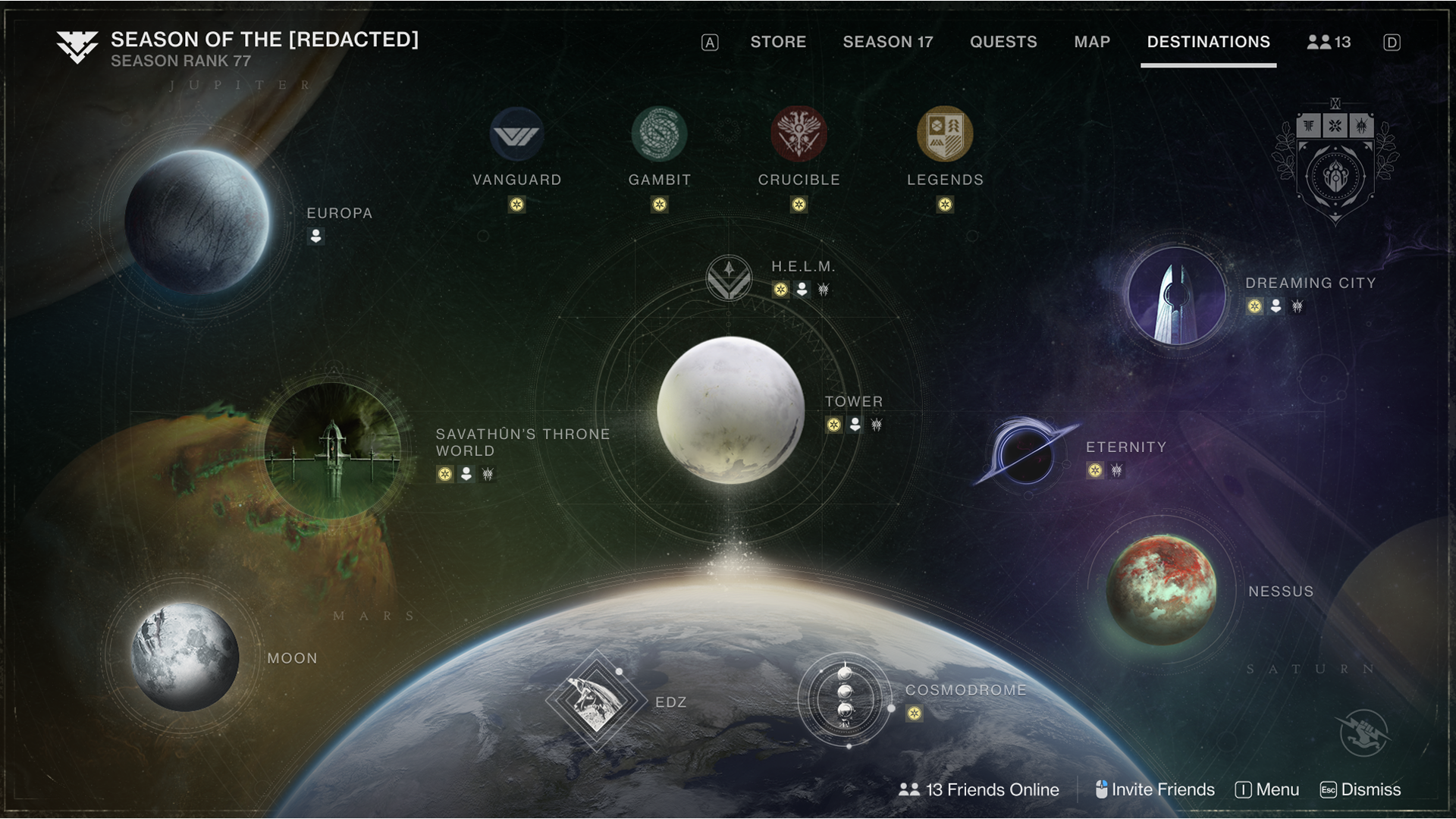
From the Director into the world.
For The Witch Queen, the portal makes a new destination feel like an invitation. The hover ring, layered light, and blurred edge bring motion into the node itself, creating a focal point within the Director.
Keep the next move clear.
From combat awareness to a destination and an activity.
01Protect attention in the world
A combat HUD must make urgent signals legible while leaving the scene readable. When a player is downed, those priorities change: match status, teammates, and revive timing become more important. The two examples show how the same interface language supports different states of play. The design challenge is to make the next useful signal clear without overwhelming the world behind it.
Combat awareness

Spectator state

02Keep context beside the choice
Free-cursor interaction makes equipment inspection direct: select an item, see its details, compare, and decide. The same relationship between a choice and its context carries into world navigation: what does this destination offer, and what can I do there?
Equipment inspection

Subclass choices

03Turn the map into a next step
The Director connects the scale of a solar system to a concrete activity choice. Its destinations and activity nodes preserve a sense of place while offering routes into play. The archived Crucible interaction below shows the transition from a broad category to a specific mode.
The product tradeoff is breadth versus orientation. A spatial overview makes the universe tangible; a focused activity layer makes it actionable. A consistent path between them helps players build familiarity even as the available experiences change.

The detail work lives in the nodes: destination silhouettes, activity emblems, labels, and selection states need to feel distinct at a glance while belonging to one navigable system.
04Stay oriented as destinations change
Beyond Light added Europa and returned the Cosmodrome while other destinations rotated out. The Witch Queen later introduced the Throne World. Navigation therefore had to accommodate changes in what was available while maintaining a recognizable relationship between destinations, goals, and activities.
During this period, the product also connected guidance across screens. Beyond Light’s November 2020 update added HUD quest-progress feedback and automatic waypoints for tracked quests with map locations. The Witch Queen’s February 2022 update brought tracked Seasonal Challenges into navigation mode.

05Make the visual language recognizable
Color, silhouette, and repeated geometry organize a large vocabulary of abilities, activities, and progression marks. These studies show how individual symbols stay distinct while reading as part of the same world.


6 node families · 12 sprite slots
| Index and family | Notes | sprite_0 | sprite_1 | sprite_2 | sprite_3 | sprite_4 | sprite_5 | sprite_6 | sprite_7 | sprite_8 | sprite_9 | sprite_10 | sprite_11 |
|---|---|---|---|---|---|---|---|---|---|---|---|---|---|
| 0biped_ |
Systemic, do not use |
Biped Player
|
|||||||||||
| 1biped_ |
Systemic, do not use |
Biped AI
|
|||||||||||
| 2biped_ |
Social spaces only. |
General
|
weapons
|
armor
|
pvp
|
postmaster
|
bounties
|
map
|
|||||
| 3primary_ |
All standard objectives. |
primary
|
secondary
|
Kill ai
|
Kill vip
|
collect
|
Ghost scan
|
recon
|
Multi-scan
|
checkpoint
|
The nine
|
Taken hunt
|
unused
|
| 5travel_ |
systemic |
03hn waypoint
|
|||||||||||
| 6Fireteam_ |
Used on interactable crates |
|
|
|
|
|
|
06Make activity state readable
Player prompts, team progress, and end-of-match results call for different levels of emphasis. These studies move from compact signals during play to a structured results table, keeping status and comparison readable as the activity changes.


Depth without losing orientation.
Worlds UX across Beyond Light and The Witch Queen.
I shipped Beyond Light and The Witch Queen as part of Bungie’s Destiny 2 team, with responsibility for Worlds UI, map, HUD, navigation, and activity systems. Those surfaces connect moment-to-moment awareness with the larger world of destinations and activities.
Worlds UX connects a player’s goal to the next available activity, even as the world around that route changes. The durable part is the relationship between intent, location, and action.